

An Introduction To Web Development (The Internet, HTML and CSS).
Learn about the Internet, and how to create a simple webpage using HTML and CSS.

I write about the things I write about
Introduction
Sometimes I reflect on my early days as a web developer and remember how challenging it was for me to decide what exactly I wanted to do in “tech”. I knew I wanted to build cool stuff but I had some difficulties starting. I tried learning user interface design on Figma but I found myself struggling with it. Next, I tried python but I only got as far as print statements and conditional loops before I gave up.. at first.
I’m writing this not-so-brief article for two kinds of people; those who have been hearing about ‘HTML and CSS’ and wondering what that is, and those who have an idea but aren’t sure what to do with it.
This article highlights:
how data moves through the internet.
basics of HTML and CSS.
how to use HTML and CSS to create and style content on the internet.
The Internet
I believe all internet users should know how the internet operates on a basic level whether you want to be a web developer or not. It should not matter if you don’t have any experience with computers or “techy” stuff.
Here’s a brief introduction of how the Internet works before going into the technicalities of how to build websites on the Internet.
How data moves through the internet
The internet is a global network/connection of computers and devices. Each computer has its address called an IP (Internet Protocol) address that helps the Internet to identify computers on the network. IP addresses are unique and can either be IPv4 or IPv6 (more on this later). An IP address is used to route data to the correct destination.
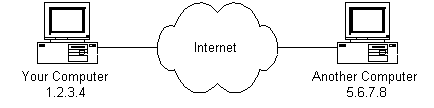
Data moves through the Internet by following a standardized layer protocol called the OSI (Open Systems Interconnection) model. Here’s a simplified description of how it works:
Data Creation and Packaging: Data created can be in form of images, text, videos or any other digital content. Before data can be transmitted on the Internet, it is divided into small units called packets. IP packets contain the header (destination and source IP address) and payload data
Routing: After creation and packaging, the packets are sent to a router. Routers are devices that examine the destination address in each packet and determine the best path to forward the packets through. A router is usually connected between networks to route packets between them
Internet Service Provider(ISP): Your ISP is responsible for connecting your device to the broader Internet. An ISP gives you access to the internet.
Backbone Network: The Internet backbone is made up of many large networks which interconnect with each other. These large networks are known as Network Service Providers(NSPs) and they peer with each other to exchange packets. Backbone networks help connect various regions and continents, ensuring global connectivity.
Destination Network: When the data packets reach the network that contains the destination device, they are handed off to the local network’s routers.
Final Destination: Finally, the data packets reach the destination device and are reassembled into the original data. The device then processes and displays the data to the user. If the receiving device needs to send a response, the process is repeated in reverse (broken down into packets, routed through the network, and delivered back to the sender)
Technologies that underpin the Internet
Various network protocols govern how data is transmitted, error checking and how devices communicate with each other.
TCP — Stands for Transmission Control Protocol and is used to send data that must arrive correctly and in order. TCP is a connection-oriented, reliable byte stream service (connection-oriented means that two applications using TCP must first establish a connection before exchanging data). TCP is used in web browsing, file transfer and many other scenarios where data integrity and reliability are crucial.
IP — Internet Protocol, unlike TCP is an unreliable, connectionless protocol. IP does not care whether a packet gets to the destination or not. IP’s job is to send and route packets to other computers. The version of IP currently used on the Internet is version 4 (IPv4) — The addresses in this address type range from 0 to 255 in terms of 0s and 1s, with four octets, each of them separated by a period (.) example 192.58.12.4. IPv6 addresses are designed of 128 bits from which 4 are hexadecimal digits, with eight sets of each block containing 16 bits separated by a colon (:) example 2001:0000:3238:DFE1:0063:0000:0000:FEFB
UDP — User Datagram Protocol is a connectionless protocol used when speed and efficiency are more important. Data sent over UDP may arrive out of order. UDP is used in real time applications like online gaming, video streaming, DNS (Domain Name System) and other situations where out of order delivery can be tolerated.
HTTP — Hyper Text Transfer Protocol is the core application that helps the World Wide Web to transfer web resources. HTTP is the protocol that web browsers and web servers use to communicate with each other over the Internet. HTTP is a connectionless text based protocol, meaning each request/response is separate from previous cycles, and the server does not maintain any information about the previous requests. After the request is served, the connection between client(your browser) and the server is disconnected. HTTP supports various methods like GET (to get data), POST (to submit data), PUT (to update data), DELETE (to remove data), etc. HTTPS is secured HTTP through encryption, meaning the request is turned into a secret code that cannot be intercepted.
DHCP- Dynamic Host Configuration Protocol is used to assign IP addresses to computers. DHCP has a server that keeps track of computers on the network and their IP addresses.
DNS — Domain Name Service keeps track of computer’s names and their corresponding IP addresses on the Internet. DNS helps the computer to know which IP address is linked to a domain name (example: when you type in www.google.com into your browser, the DNS server helps to resolve this address into the numerical value that is the IP address)
There are a lot more protocols like IMAP (Internet Message Access Protocol), SMTP (Simple Mail Transfer Protocol), FTP (File Transfer Protocol), SSH (Secure Shell), however, I will limit the discussion to the ones explained above.
A webpage is a document that displays images and texts linked together. A website is a collection of webpages. Web servers store, process and deliver web content to browsers over the Internet. The browser works by sending a request to a web server, which responds by returning the content to be displayed as a webpage. This process is called the request-response cycle.
When you type in an address in your web browser, this is a URL (Uniform Resource Locator), and the URL contains information about the protocol (eg HTTP or HTTPS) & address of the website you want to visit.
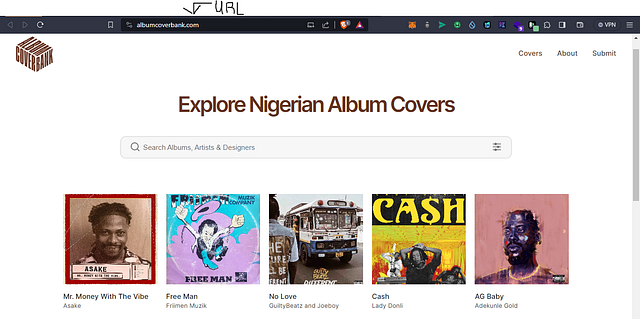
In the screenshot above,
The URL contains a domain name, which the browser resolves by contacting the DNS to get the corresponding IP address for the web server.
The browser connects to the server and sends an HTTP request for the desired web page (https://albumcoverbank.com).
The web server receives the request and checks for the desired page. If the page exists, the server sends it back. If the page does not exist, the server sends a HTTP 404 error (Page Not Found).
The web browser receives the page back and the connection is closed.
For each element needed, the browser makes additional connections and HTTP requests to the server as required.
HTML(Hyper Text Markup Language), CSS(Cascading Style Sheets) and Javascript are the primary tools used to create most web pages you see on the Internet today.
What is HTML?
Hyper Text Markup Language (HTML) is the standard markup language for creating websites and pages on the internet. HyperText is text displayed on a computer, with links (hyperlinks) to other text that you can immediately access by clicking or tapping. A markup language is not a programming language, but more like a computer language that is used to apply layout and formatting to a text document.
Think of HTML as the building block of the web used to define the structure and content of a webpage.
HTML is often assisted by technologies such as CSS for styling and scripting languages like Javascript which affects the behavior and interactivity of web pages.
With knowledge of HTML and CSS, you can easily build a website that displays in your web browser.
What is an HTML Element?
HTML has a set of elements or tags, which allow you to define various parts of a web page such as headings, links, paragraphs, images, forms and more.
An HTML element is defined by its start tag, some content in between, and an end tag:
<h1>This is the heading's content</h1>
<h1> — heading1 is the start tag.
“This is the heading’s content” is the text that will be displayed on the webpage.
</h1> — the end/ closing tag.
Some HTML elements are self-closing like the <img /> tag. While some have no content like the <br> element, which specifies a line break. Elements like the <br> element are called empty elements and do not have an end tag.
A basic example:
<!DOCTYPE html>
<html>
<head>
    <title>My Web Page</title>
</head>
<body>
    <h1>This is the Heading's Content</h1>
    <p>This is a paragraph containing more content.</p>
    <a href="https://reine.dev/">Visit reine.dev</a>
</body>
</html>
In this example, I use Visual Studio code as my preferred text editor. Download and install VS code on your computer if you do not have it installed. To create an html document, navigate to your text editor and create a new file, called index.html.
Example explained:
The <!DOCTYPE html> declaration defines that this document is an HTML5 document.
The <html> element is the root element of an HTML page.
The <head> element contains meta-information about the HTML page
The <title> element specifies a title for the HTML page (which is shown in the browser’s title bar or in the page’s tab)
The <body> element defines the document’s body and is a container for all the visible contents that appear in the browser, such as headings, paragraphs, images, hyperlinks, tables, lists, etc.
The <h1> element defines a large heading.
The <p> element defines a paragraph.
The <a> element defines a hyperlink with the href attribute, that specifies the URL of the page the link goes to.
Web browsers help read HTML documents by using the html tags to determine how to display the document.
Semantic HTML
You may have heard of semantic HTML, which simply means using HTML elements to make web content more meaningful and understandable, not only to humans but also to search engines and assistive technologies like keyboards and screen readers for people with disabilities. Semantic elements are elements with a meaning as opposed to having just <div> tags in your HTML.
Below are some examples of semantic HTML elements:
<header>: Used to define the header of a document or a section. Typically, it contains the website logo, name and navigation.
<nav>: Represents a navigation menu, such as the website’s main menu or a list of links for moving around the site.
<main>: Encloses the primary content of the web. A page should have only one <main> element.
<article>: Represents a self-contained piece of content, such as a blog post, news article, or forum post.
<section>: Used to define sections within a document, often with a heading to describe its content.
<footer>: Defines the footer of a document or a section. It usually contains copyright information, contact details, or other metadata.
Today, HTML5 is the widely adopted and current version of the hypertext markup language. Throughout its history, HTML has played a crucial role in shaping the World Wide Web and enabling the creation of interconnected and accessible information on the Internet.
What is CSS?
Cascading Style Sheets is a language used for describing the presentation and display of a document written in HTML or other markup languages. CSS allows developers and designers to control all design aspects of a web page such as the layout, colors, fonts, arrangement and so on.
The “Cascading” in CSS refers to the order of priority when multiple style rules apply to the same element. CSS uses a system to determine which style rules should take precedence, and this is known as the “cascading order.”
CSS Selectors
CSS uses style rules to define how elements should be displayed. A style rule consists of a selector and a declaration block which contains the styling instructions.
p {
color: red;
}
In the example above, all <p> elements will have a red text color:
p is the element selector, which points to the element you want to style.
In the declaration block { }, ‘color’ is the property specified while ‘black’ is the value.
CSS has a number of different selector types you can read more about here
External, Internal, and Inline Styles
CSS can be applied to HTML documents in three ways: as an external stylesheet (linked in the HTML document), as internal styles (embedded in the <style> element within the HTML document), or as inline styles (applied directly to individual HTML elements using the style attribute).
Conclusion
HTML is essential for proper structure and navigation of web pages. Always write HTML code with accessibility in mind and try to make your HTML as semantic as possible. CSS is a powerful tool for web designers and developers to create visually appealing and user-friendly web pages. Separating content (HTML) from presentation (CSS) allows for a flexible and maintainable approach to web design. CSS is essential for making web pages responsive, accessible, and visually engaging.
My next web development article will dive deeper into creating a simple webpage with more details about CSS. You can read more about HTML and CSS and also practice before then.
Thank you for reading ❤.. share, like or comment if you like my work!
Follow me on Linkedin or Github to connect with me.
Resources
How Does the Internet Work?
A slightly technical whitepaper explaining what makes the Internet tick.web.stanford.edu

